Swift 2.0 下面向协议的MVVM架构实践
我将会使用一个简单的例子。一个只有一个设置选项的设置页面,把应用设置为Minion模式,当然你也可以扩展为多个设置选项。
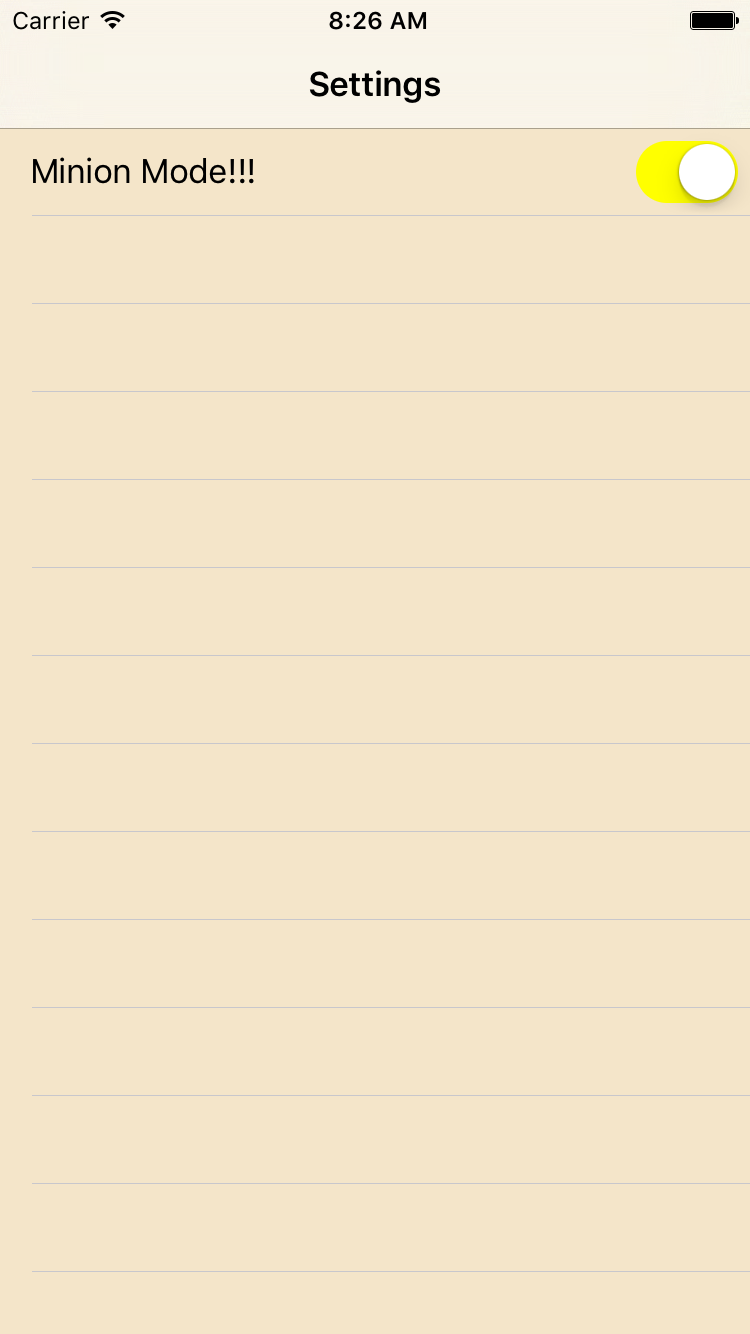
View Cell
一个极其普通的Cell,它包含一个Label和一个开关控件。你也可以在其他地方使用这个Cell,例如注册页面添加一个“记住我”的开关选项。所以,你应该保持这个页面通用性。
一个复杂的配置
通常,我在cell中使用一个设置方法,来监听所有对应用设置可能的变更,这看起来是这样的:
class SwitchWithTextTableViewCell: UITableViewCell {

    @IBOutlet private weak var label: UILabel!
    @IBOutlet private weak var switchToggle: UISwitch!

    typealias onSwitchToggleHandlerType = (switchOn: Bool) -> Void
    private var onSwitchToggleHandler: onSwitchToggleHandlerType?

    override func awakeFromNib() {
        super.awakeFromNib()
    }

    func configure(withTitle title: String,
        switchOn: Bool,
        onSwitchToggleHandler: onSwitchToggleHandlerType? = nil)
    {
        label.text = title
        switchToggle.on = switchOn

        self.onSwitchToggleHandler = onSwitchToggleHandler
    }

    @IBAction func onSwitchToggle(sender: UISwitch) {
        onSwitchToggleHandler?(switchOn: sender.on)
    }
}
通过 Swift 的默认参数,可以添加其他的设置选项到这个设置方法,而不必改变代码中的其他地方,使用起来非常方便。例如,当设计师说开关按钮的颜色需应该各不相同,这时候我就可以添加一个默认参数。
func configure(withTitle title: String,
        switchOn: Bool,
        switchColor: UIColor = .purpleColor(),
        onSwitchToggleHandler: onSwitchToggleHandlerType? = nil)
    {
        label.text = title
        switchToggle.on = switchOn
        // color option added!
        switchToggle.onTintColor = switchColor

        self.onSwitchToggleHandler = onSwitchToggleHandler
    }
虽然在这种情况下看起来并不是什么大问题,但是随着时间的增加,事实上这个方法将会变得非常冗长、复杂!是时候由面向协议的编程方法登场了。
面向协议的编程方法
protocol SwitchWithTextCellProtocol {
    var title: String { get }
    var switchOn: Bool { get }

    func onSwitchTogleOn(on: Bool)
}

class SwitchWithTextTableViewCell: UITableViewCell {

    @IBOutlet private weak var label: UILabel!
    @IBOutlet private weak var switchToggle: UISwitch!

    private var delegate: SwitchWithTextCellProtocol?

    override func awakeFromNib() {
        super.awakeFromNib()
    }

    func configure(withDelegate delegate: SwitchWithTextCellProtocol) {
        self.delegate = delegate

        label.text = delegate.title
        switchToggle.on = delegate.switchOn
    }

    @IBAction func onSwitchToggle(sender: UISwitch) {
        delegate?.onSwitchTogleOn(sender.on)
    }
}
当设计师说需要改变开关控件颜色的时候会发生什么?以下代码可以展现协议扩展的奇妙之处。
extension SwitchWithTextCellProtocol {

    // set the default color here!
    func switchColor() -> UIColor {
        return .purpleColor()
    }
}

class SwitchWithTextTableViewCell: UITableViewCell {

    // truncated, see above

    func configure(withDelegate delegate: SwitchWithTextCellProtocol) {
        self.delegate = delegate

        label.text = delegate.title
        switchToggle.on = delegate.switchOn
        // color option added!
        switchToggle.onTintColor = delegate.switchColor()
    }
}
在以上代码中协议的扩展实现了默认的switchColor选项,所以,任何已经实现了这个协议或者并不关心设置开关颜色的人,不用关注这个扩展。只有一个具有不同颜色的新的开关控件可以实现。
ViewModel
所以现在剩下的事情将会非常简单。我将会为MinionMode的设置cell写一个ViewModel。
import UIKit

struct MinionModeViewModel: SwitchWithTextCellProtocol {
    var title = "Minion Mode!!!"
    var switchOn = true

    func onSwitchTogleOn(on: Bool) {
        if on {
            print("The Minions are here to stay!")
        } else {
            print("The Minions went out to play!")
        }
    }

    func switchColor() -> UIColor {
        return .yellowColor()
    }
}
ViewController
最后一步就是在ViewController中设置cell的时候将ViewModel传给cell。
import UIKit

class SettingsViewController: UITableViewController {

    enum Setting: Int {
        case MinionMode
        // other settings here
    }

    override func viewDidLoad() {
        super.viewDidLoad()
    }

    // MARK: - Table view data source

    override func tableView(tableView: UITableView,
        numberOfRowsInSection section: Int) -> Int
    {
        return 1
    }

    override func tableView(tableView: UITableView,
        cellForRowAtIndexPath indexPath: NSIndexPath) -> UITableViewCell
    {
        if let setting = Setting(rawValue: indexPath.row) {
            switch setting {
            case .MinionMode:
                let cell = tableView.dequeueReusableCellWithIdentifier("SwitchWithTextTableViewCell", forIndexPath: indexPath) as! SwitchWithTextTableViewCell

                // this is where the magic happens!
                cell.configure(withDelegate: MinionModeViewModel())
                return cell
            }
        }

        return tableView.dequeueReusableCellWithIdentifier("defaultCell", forIndexPath: indexPath)
    }

}
通过使用协议的扩展,是面向协议的编程方法有了很大的意义,并且我在寻找更多的使用场景。
更新:将数据源和代理分开
在评论中,Marc Baldwin 建议分开cell的数据源和代理方法到两个协议中,就像UITableView中的那样。我很赞成这个意见,以下是我修改后的代码。
View Cell
Cell将拥有两个协议,并且任何一个协议都可以设置这个cell。
import UIKit

protocol SwitchWithTextCellDataSource {
    var title: String { get }
    var switchOn: Bool { get }
}

protocol SwitchWithTextCellDelegate {
    func onSwitchTogleOn(on: Bool)

    var switchColor: UIColor { get }
    var textColor: UIColor { get }
    var font: UIFont { get }
}

extension SwitchWithTextCellDelegate {

    var switchColor: UIColor {
        return .purpleColor()
    }

    var textColor: UIColor {
        return .blackColor()
    }

    var font: UIFont {
        return .systemFontOfSize(17)
    }
}

class SwitchWithTextTableViewCell: UITableViewCell {

    @IBOutlet private weak var label: UILabel!
    @IBOutlet private weak var switchToggle: UISwitch!

    private var dataSource: SwitchWithTextCellDataSource?
    private var delegate: SwitchWithTextCellDelegate?

    override func awakeFromNib() {
        super.awakeFromNib()
    }

    func configure(withDataSource dataSource: SwitchWithTextCellDataSource, delegate: SwitchWithTextCellDelegate?) {
        self.dataSource = dataSource
        self.delegate = delegate

        label.text = dataSource.title
        switchToggle.on = dataSource.switchOn
        // color option added!
        switchToggle.onTintColor = delegate?.switchColor
    }

    @IBAction func onSwitchToggle(sender: UISwitch) {
        delegate?.onSwitchTogleOn(sender.on)
    }
}
ViewModel
你现在可以在扩展里把数据源和delegate逻辑分开了:
import UIKit

struct MinionModeViewModel: SwitchWithTextCellDataSource {
    var title = "Minion Mode!!!"
    var switchOn = true
}

extension MinionModeViewModel: SwitchWithTextCellDelegate {

    func onSwitchTogleOn(on: Bool) {
        if on {
            print("The Minions are here to stay!")
        } else {
            print("The Minions went out to play!")
        }
    }

    var switchColor: UIColor {
        return .yellowColor()
    }
}
ViewController
这一部分是我不十分确定,ViewController不能传递ViewModel两次:
override func tableView(tableView: UITableView,
        cellForRowAtIndexPath indexPath: NSIndexPath) -> UITableViewCell
    {
        if let setting = Setting(rawValue: indexPath.row) {
            switch setting {
            case .MinionMode:
                let cell = tableView.dequeueReusableCellWithIdentifier("SwitchWithTextTableViewCell", forIndexPath: indexPath) as! SwitchWithTextTableViewCell

                // this is where the magic happens!
                let viewModel = MinionModeViewModel()
                cell.configure(withDataSource: viewModel, delegate: viewModel)
                return cell
            }
        }

        return tableView.dequeueReusableCellWithIdentifier("defaultCell", forIndexPath: indexPath)
    }